FOR SENSEI LMS SITE OWNERS
If you've ever stared at your Sensei LMS dashboard, wondering how to get your student data out of it…
You're not alone. Sensei LMS is a powerful courseware platform — but it was never designed to hand you a tidy spreadsheet of every learner, every course, and every lesson status. That's exactly the gap this plugin fills.
Stop manually tracking student enrollments. Get every learner, course, and lesson status exported in seconds.
See the story unfold
Watch it live before you decide — no pressure, just clarity.
Demo Video on Sensei LMS Learner Export Plugin
Watch how the Woo Sensei LMS Learners Export plugin changes the way you manage student data
Here's what we hear every day:
😤 There's no built-in learner export in Sensei LMS
Sensei LMS doesn't let you bulk export student enrollment data, leaving you to manually copy user records one by one. It's exhausting and error-prone.
📊 I can't see who's completed what lesson
Without a dedicated export tool, tracking which students completed which lessons — or are still in progress — is nearly impossible at scale. Reporting becomes guesswork.
🔌 Generic export plugins miss all the LMS data
Standard WordPress export plugins don't capture course IDs, lesson IDs, enrollment status, or purchase order details specific to Sensei LMS. You end up with a useless file.
Here's what changes everything:
Woo Sensei LMS Learners Export is purpose-built for Sensei. It gives you a simple, clean interface to export every enrolled learner — along with their course enrollments, lesson progress, contact details, and order information — into a single downloadable file.
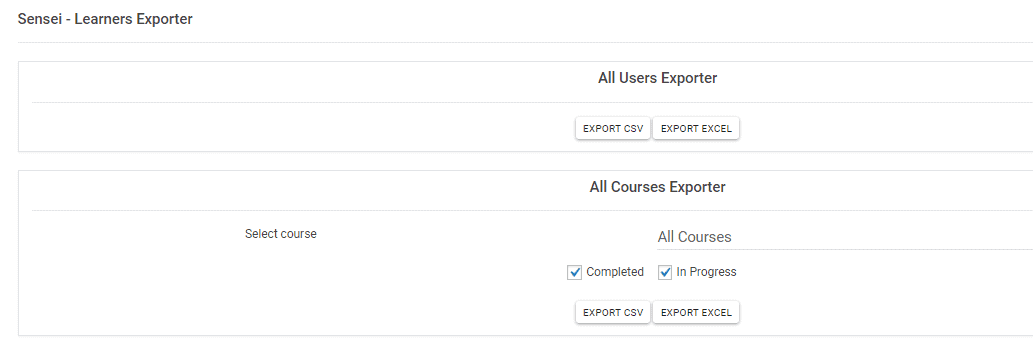
Whether you need a full export of all users across every course, or a targeted export for one specific course, this plugin handles it with minimal clicks. No complex configuration. No developer needed.
Export User ID
Include each learner's unique WordPress User ID in your export for precise record-keeping and cross-referencing with your database.
Export First & Last Name
Pull the full name of every enrolled learner so your exported spreadsheet is immediately readable and actionable.
Export User Email
Capture the email address of every student, making it easy to follow up, re-engage, or sync with your CRM or email platform.
Export User Role
See the WordPress role assigned to each learner — useful for distinguishing between student types, admins, or custom roles in your system.
Export Course ID
Identify exactly which course each learner is enrolled in by including the Sensei Course ID in every exported row.
Export Lesson ID
Go granular with lesson-level data — export the specific Lesson ID each learner has interacted with to track curriculum progress.
Export Enrollment & Lesson Status
Know at a glance whether a learner has completed a lesson, is still in progress, or hasn't started — critical for reporting and follow-up.
Export Address
Include the learner's address in your export — ideal for compliance, certificate mailing, or corporate training records.
Export Contact Number
Export each learner's contact number for direct outreach, attendance coordination, or corporate training administration.
Export Organization
Capture the organization associated with each learner — perfect for B2B training providers managing multiple corporate clients.
Export Ordered By & Purchase Order No.
Include purchase order details and the ordering party in your export, making it easy to reconcile training purchases with finance teams.
Export by Single Course or All Courses
Choose to export learners from one specific course or pull a complete export across all courses in your Sensei LMS installation.
Simple, Clean Interface
The plugin UI is straightforward and minimal — no learning curve. Select your export scope and download your data in just a few clicks.
Your journey starts here
Three simple steps stand between you and a complete, clean export of your Sensei LMS learner data.
Install & Activate the Plugin
Purchase and download the plugin, then install it on your WordPress site just like any standard plugin. It connects automatically to your existing Sensei LMS setup — no technical configuration needed.
Select Your Export Scope
Use the simple interface to choose whether you want to export learners from a single course or all courses across your entire Sensei LMS installation. A couple of clicks is all it takes.
Download Your Learner Data
Click export and instantly download a file containing all selected learner fields — from names and emails to lesson status, course IDs, and purchase order details. Open it in Excel or Google Sheets and you're done.
Built for peace of mind
Every purchase comes with genuine reassurances — not just promises. Here's what you can count on:
Trusted by Sensei LMS site owners who need reliable, repeatable access to their learner data — without technical headaches.
One decision that changes everything
One affordable annual licence. Every enrolled student. Every course. Every lesson status. All the data you need — exported instantly.
Annual Licence
- You get: export from one course or all courses
- You get: 13 exportable data fields per learner
- You get: Course ID and Lesson ID included
- You get: enrollment and lesson completion status
- You get: organization, address, and contact number fields
- You get: purchase order number and ordered-by fields
- You get: free support while your subscription is active
- You get: one domain licence per purchase
✓ 30-day full money-back guarantee. No risk.
Your questions, honestly answered
No jargon. No sales spin. Just straight answers to the things you actually want to know.
Does this plugin work with the free version of Sensei LMS?
Yes, Woo Sensei LMS Learners Export is an extension plugin for the Sensei courseware plugin (also known as Woo Sensei). It is designed to work with the Sensei LMS plugin installed on your WordPress site.
What file format does the export produce?
The plugin exports learner data in a spreadsheet-compatible format so you can open and work with it immediately in Excel, Google Sheets, or similar tools.
Can I export learners from just one specific course?
Yes. You can choose to export learners enrolled in a single course, or export all learners across every course in your Sensei LMS installation — your choice.
How many domains does one licence cover?
Each licence covers one domain. If you need to use the plugin on multiple sites, you will need a separate licence for each domain.
What happens if I don't renew my annual subscription?
Free support and updates are included for as long as your annual subscription remains active. If you do not renew, you will no longer receive updates or support, though the plugin will continue to function on your site.
Is there a refund policy if the plugin doesn't work for me?
Yes. A 30-day full refund guarantee is included with every purchase. If the plugin does not meet your needs within 30 days, you can request a full refund — no questions asked.
Get Your Sensei LMS Learner Data Out in Minutes
One affordable annual licence. Every enrolled student. Every course. Every lesson status. All the data you need — exported instantly.
✓ Instant access · ✓ 30-day money-back guarantee · ✓ Annual updates included