Introducing
Mix & Assign Quizzes Across Any Course
Combine quizzes from multiple existing courses into one powerful mixed quiz — then assign it to any course or topic instantly from one settings page.
Watch It In Action
See It Live
The Challenge
Sound Familiar?
😩 Rebuilding the same quizzes from scratch
Every time you create a new course, you waste hours recreating quiz questions that already exist in your other courses.
🔀 No way to combine quizzes across courses
Tutor LMS out of the box won't let you pull questions from multiple existing quizzes into one unified assessment.
🗂️ Assigning quizzes requires navigating deep into each course
Without a central control point, attaching a quiz to a course or topic means hunting through multiple admin screens every time.
Everything You Get
One Plugin. Endless Quiz Combinations.
Select and combine questions from quizzes that belong to any of your already-created courses, merging them into one new mixed quiz effortlessly.
Assign the newly created mixed quiz to any existing course or topic straight from the plugin settings page — no need to navigate away.
Don't have a course to assign your mixed quiz to yet? Create a brand-new course directly within the plugin and assign the quiz immediately.
Generate a new topic inside any course and attach your mixed quiz to it without leaving the plugin interface.
All mixing, assigning, and course/topic creation actions are managed from a single, streamlined plugin settings page for maximum efficiency.
Built specifically for Tutor LMS, the plugin works natively within your existing WordPress and Tutor LMS setup — no conflicts, no workarounds.
Your purchase covers one domain, giving you a dedicated, legitimate licence for your primary eLearning site.
Receive all future plugin updates at no extra cost for as long as your subscription remains active, keeping your site compatible and secure.
Access dedicated support throughout your active subscription period so you can get help whenever you need it.
Simple Process
Up & Running in Three Steps
Install & Activate the Plugin
Upload the Tutor LMS Quiz Mixer Plugin to your WordPress site and activate it. It integrates immediately with your existing Tutor LMS installation and all your current courses and quizzes.
Select Quizzes and Mix Them
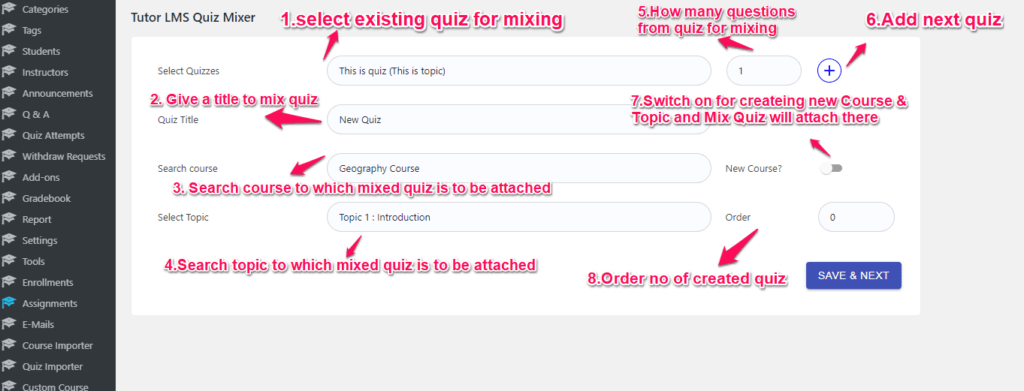
Navigate to the plugin settings page, choose the quizzes you want to combine from your existing courses, and create your new mixed quiz with a few clicks.
Assign to a Course or Topic
From the same settings page, assign the mixed quiz to any existing course or topic — or create a brand-new course or topic right there and attach the quiz instantly.
Your Confidence Guaranteed
Secure Checkout
Instant Access
Annual Updates
Support Included
Single Domain Licence
Ready to Get Started?
Your Investment
Frequently Asked
Questions & Answers
Is this a one-time payment or a subscription?
It is a subscription-based licence covering a single domain. Your subscription includes free updates and free support for as long as it remains active. If the subscription lapses, you will lose access to updates and support, and plugin functionality may be affected.
How many domains does the licence cover?
The licence covers one domain. If you need to use the plugin on additional domains, you will need to purchase a separate licence for each.
What happens if my subscription expires?
Once your subscription lapses you will no longer receive updates or support. Plugin functionality may also be affected, so it is recommended to keep your subscription active.
Does this plugin work with any version of Tutor LMS?
The plugin is built specifically for Tutor LMS. It is recommended to keep both Tutor LMS and the Quiz Mixer Plugin updated to ensure full compatibility.
Can I create an entirely new course when assigning a mixed quiz?
Yes. From the plugin settings page you can create a brand-new course or a new topic and assign your mixed quiz to it immediately — you do not need to set up the course separately first.
Can I mix quizzes from multiple different courses at once?
Yes. The core capability of the plugin is selecting quizzes from any of your already-created courses across Tutor LMS and combining them into one new mixed quiz.
Stop Rebuilding Quizzes. Start Mixing Them.
Get the Tutor LMS Quiz Mixer Plugin today and turn your existing quiz library into unlimited new assessments — assigned and ready in minutes.