Sale!

Tutor LMS Negative Marking Plugin

Original price was: $75.00.Current price is: $69.00.

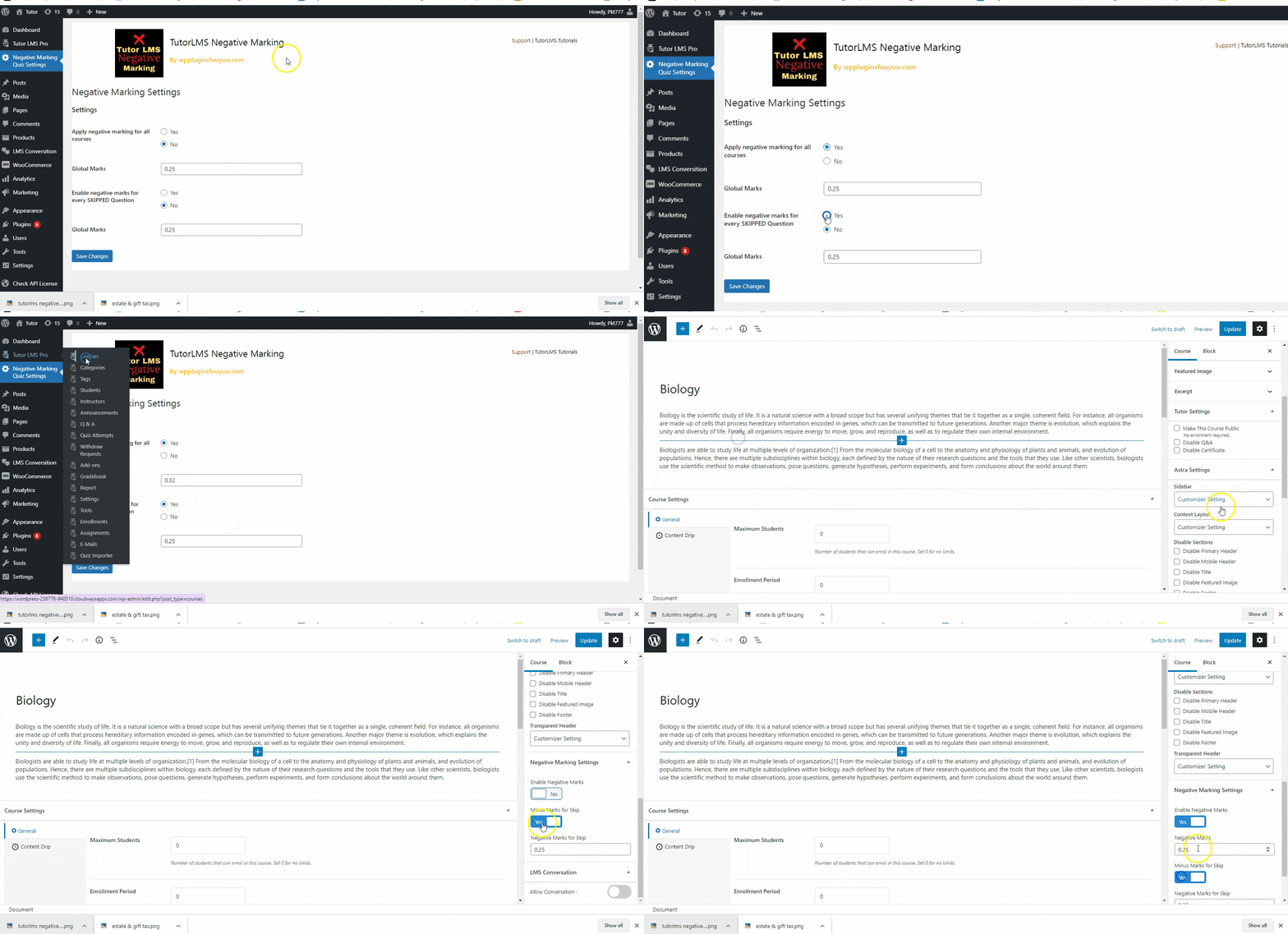
TutorLMS Negative Marking Plugin solves the long-awaited problem for a course creator on TutorLMS LMS-based courseware site. Once you install our newest extension plugin for Sensei , you can set the negative marks for incorrect answers as well as for a skipped answers. The plugin provides global settings for negative parks as well as specific to a particular quiz. That you will get two toggles under lessons. See below :
Want a discount? Become a member by purchasing Developer Plan -Silver or Developer Plan -Gold!

Penalize Wrong Answers, Raise Quiz Standards

Add negative marking to Tutor LMS quizzes — deduct points for incorrect or skipped answers globally or per quiz, in minutes. Stop students from gaming your assessments with random guessing and enforce real exam-grade discipline across every course you run.

✓ One-time purchase, no subscription ✓ 12 months of free upgrades ✓ 6 months of dedicated support

Tutor LMS Negative Marking Plugin screenshot

Product Demo

Watch how easy it is to configure negative marking on your Tutor LMS site.

▶ Watch the Demo

Demo video on TutorLMS negative marking

The Problem — And the Fix

Without Negative Marking…

😤

Students game quizzes by guessing randomly

Without penalties, random guesses can still result in a pass — making your assessments meaningless.

🔧

Tutor LMS has no built-in negative marking

Course creators have had no native way to deduct marks for wrong or skipped answers — until now.

⚙️

Managing penalties per quiz wastes hours

Setting quiz rules one by one across dozens of courses is tedious and error-prone.

With This Plugin…

Real exam discipline stops guessing cold

Point deductions make every answer consequential — students must rely on genuine knowledge.

Fill the gap Tutor LMS left open

Install once and immediately gain control over how your quizzes reward and penalise behaviour.

Global defaults + per-quiz overrides in one place

Set platform-wide rules once, then fine-tune any quiz in seconds using two intuitive toggles.

Everything You Need to Enforce Exam Standards

Negative Marks for Incorrect Answers

Deduct a configurable number of marks whenever a student selects a wrong answer, discouraging random guessing and rewarding genuine knowledge.

⏭️

Negative Marks for Skipped Questions

Optionally penalise students who skip questions without answering, ensuring every unattempted item carries a consequence.

🔀

Apply Both Penalties Simultaneously

Enable negative marking for both incorrect answers and skipped questions at the same time for the strictest exam-grade assessment environment.

🌐

Global Negative Marking Settings

Set default negative mark values once across your entire Tutor LMS site so every quiz automatically inherits your platform-wide rules.

🎯

Per-Quiz Negative Marking Override

Override global settings for any individual quiz, giving you granular control to apply different deduction rules to specific courses or assessments.

🔘

Two-Toggle Lesson-Level Controls

Two intuitive toggles appear directly under your lesson settings — one for incorrect answers, one for skipped answers — making configuration fast and clear.

🔄

Tutor LMS 1.9+ Compatibility

Fully tested on Tutor LMS Free and Pro version 1.9 and above, with backward compatibility so existing sites upgrade without breaking changes.

🔑

Single-Domain API Licence

Each purchase includes an API licence for use on one domain, keeping your plugin activation secure and straightforward.

📧

Staging-to-Live Site Transfer

Used the API on a staging site first? Simply email support for a one-time additional API activation to deploy on your live domain at no extra cost.

🛡️

6 Months of Priority Support

Every purchase comes with six months of dedicated support, so any integration questions or issues are handled promptly by the development team.

⬆️

12 Months of Free Upgrades

All product upgrades released within 12 months of your purchase date are included at no additional cost, keeping your plugin current automatically.

Up and Running in Three Steps

1

Install & Activate the Plugin

Purchase the plugin, receive your API licence key, then install and activate it on your Tutor LMS site just like any standard WordPress plugin.

2

Configure Global or Per-Quiz Settings

Navigate to the plugin settings to set your global negative mark values, then optionally override those values on any individual quiz using the two toggles under your lesson settings.

3

Publish & Let the Plugin Enforce Penalties

Your quizzes now automatically deduct marks for incorrect or skipped answers based on your configuration — no additional setup required per student or attempt.

Buy with Complete Confidence

Every purchase is backed by a straightforward set of guarantees — no hidden fees, no surprises.

✓ Secure Checkout ✓ Instant Access After Purchase ✓ 12 Months of Free Upgrades ✓ 6 Months Dedicated Support ✓ One-Time Payment — No Subscription

Simple, One-Time Pricing

Tutor LMS Negative Marking Plugin

$69 $75

one-time payment

  • Negative marks for incorrect answers
  • Negative marks for skipped questions
  • Global site-wide settings
  • Per-quiz override controls
  • Tutor LMS Free & Pro 1.9+ compatible
  • Single-domain API licence
  • 6 months of dedicated support
  • 12 months of free upgrades

No setup fees · Instant access · No recurring charges

Frequently Asked Questions

Does this plugin work with both Tutor LMS Free and Pro?

Yes. The Negative Marking Plugin is tested and compatible with both the free and Pro versions of Tutor LMS from version 1.9 onwards, and it is backward compatible with earlier supported builds.

Can I set different negative mark values for different quizzes?

Absolutely. The plugin provides global settings that apply across your entire site by default, and per-quiz overrides so you can assign unique deduction values to any individual quiz or course.

What if I only want to penalise incorrect answers but not skipped ones?

Each penalty type is controlled by its own toggle. You can enable negative marks for incorrect answers, leave the skipped-question toggle off, or activate both — entirely your choice.

My plugin is currently on a staging site. Can I move it to my live site?

Yes. If you activated your API licence on a staging environment first, simply email the support team with your request and they will issue a one-time additional API activation for your live domain at no charge.

How long do support and upgrades last after purchase?

Your purchase includes six months of dedicated support and 12 months of free upgrades. Any new version of the plugin released within that 12-month window is available to you at no extra cost.

Is this a subscription or a one-time payment?

It is a one-time purchase. There are no recurring fees. You pay once and receive the plugin, your single-domain API licence, six months of support, and 12 months of upgrades as described.

Add Exam-Grade Fairness to Your Tutor LMS Site Today

One-time payment of $69. Includes your API licence, 6 months of support, and 12 months of free upgrades. No subscription, no surprises.

✓ Instant delivery  ·  ✓ One-time payment  ·  ✓ No hidden fees

As an Amazon Associate I earn from qualifying purchases.