Masterstudy LMS Quiz Importer

$65.00

STM Masterstudy quiz importer plugin lets user import quizzes from Comma Separated Value or CSV template file. Not only that, you can assign the imported quiz to courses and topics as well automatically. In the current version, you can import four types of quizzes.

Single Choice Question
MultiChoice Question
Item match
Fill the Gap Questions

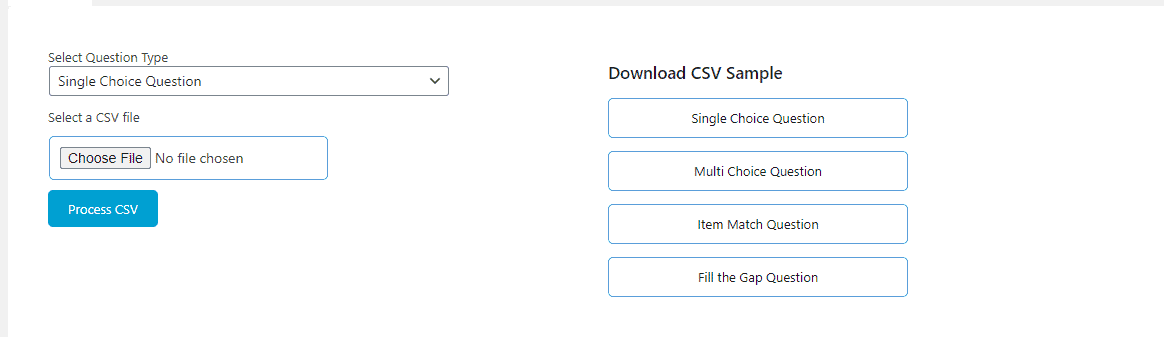
For each type, a separate template file is downloadable from the setting page itself as shown in the picture below:
Want a discount? Become a member by purchasing Developer Plan -Silver or Developer Plan -Gold!

65 USD

Import Quizzes Into Masterstudy LMS Instantly

Save hours of manual quiz entry — import Single Choice, MultiChoice, Item Match, and Fill the Gap questions from CSV or Google Sheets directly into your Masterstudy LMS courses.

Get Instant Access
✓ Instant download✓ Annual licence✓ Free updates
Masterstudy LMS Quiz Importer

Sound familiar?

Manual quiz creation wastes hours

Entering dozens of questions one by one inside Masterstudy LMS is tedious and error-prone, especially when building large courses.

📋
No easy way to bulk-upload questions

Without an importer, there's no native method to bring pre-built question banks from spreadsheets into Masterstudy LMS courses.

🔗
Quizzes aren't auto-assigned to courses

Even if you could import questions, manually linking each quiz to the right course and topic adds yet another layer of repetitive work.

Bulk-Import Any Quiz Type Into Masterstudy LMS in Minutes

The STM Masterstudy LMS Quiz Importer plugin lets you prepare your questions in a familiar CSV spreadsheet or Google Sheet, then push them straight into your Masterstudy LMS installation with a single import action. Four question types are fully supported, and each has its own downloadable template file available right from the plugin settings page.

Updated in April 2026, the plugin now supports live Google Sheets imports alongside CSV, so your team can collaborate on question banks in real time and publish them to your LMS without ever touching a manual form. Courses and topics are assigned automatically during the import, making large-scale course builds dramatically faster.

Everything you get

📥

CSV Quiz Import

Import quizzes from a Comma Separated Value (CSV) file directly into Masterstudy LMS — no manual entry required.

📊

Google Sheets Import

Connect and import quizzes live from Google Sheets, released April 2026, enabling real-time team collaboration on question banks.

☑️

Single Choice Question Type

Full support for importing Single Choice questions where students select one correct answer from multiple options.

MultiChoice Question Type

Import MultiChoice questions that allow students to select more than one correct answer in a single question.

🔀

Item Match Question Type

Import Item Match questions that require students to pair or match related items from two columns.

✏️

Fill the Gap Question Type

Import Fill the Gap (cloze-style) questions where students type missing words directly into a sentence or paragraph.

📄

Downloadable Template Files

A separate, ready-to-use template file for each of the four question types is downloadable straight from the plugin settings page.

🔗

Auto-Assignment to Courses & Topics

Imported quizzes are automatically assigned to the specified courses and topics during the import process — no manual linking needed.

⚙️

Settings Page with Template Access

A dedicated settings page inside WordPress provides download links for all templates and controls for managing import configurations.

🛡️

Single Domain API Licence

Each purchase includes an API licence for use on one domain, with a one-time reassignment option available by email for staging-to-live migrations.

🔄

6 Months Free Support & Updates

Every purchase includes free support and plugin updates for six months from the date of purchase.

🧩

WordPress & Masterstudy Compatibility

Tested and compatible with WordPress 5.6+ and Masterstudy LMS version 2.5 and above.

Up and running in 3 steps

1

Download the Template File

Go to the plugin settings page inside your WordPress dashboard and download the CSV template that matches your question type — Single Choice, MultiChoice, Item Match, or Fill the Gap.

2

Populate Your Questions in CSV or Google Sheets

Fill in the template with your questions, answer options, and correct answers. You can work locally in a spreadsheet app or collaboratively in Google Sheets.

3

Import and Auto-Assign to Courses

Upload your completed file (or connect your Google Sheet) via the importer. The plugin imports all questions and automatically assigns the quiz to your chosen course and topic.

Trusted by publishers worldwide

“This plugin saved me an entire weekend. I had 300 questions in a spreadsheet and they were all inside Masterstudy LMS, correctly assigned to courses, in under 20 minutes. The Google Sheets integration is a game-changer for my team.”

Rachel T. — Online Course Creator

“The downloadable templates make it completely foolproof. I filled in the CSV, uploaded it, and every Fill the Gap and MultiChoice question appeared exactly where I needed it. Well worth the $65.”

Daniel M. — eLearning Developer
✓ WooCommerce Compatible ✓ No Coding Required ✓ Instant Access ✓ Annual Updates ✓ Support Included

Simple, honest pricing

65 USD
per year · single site
  • Import quizzes via CSV or Google Sheets
  • 4 question types: Single Choice, MultiChoice, Item Match, Fill the Gap
  • Downloadable template files for each question type
  • Auto-assignment of quizzes to courses & topics
  • Single domain API licence
  • Staging-to-live domain reassignment on request
  • 6 months free support & updates
  • Compatible with WordPress 5.6+ & Masterstudy LMS 2.5+
Get Instant Access →

Support included with your licence

Frequently asked questions

Which question types can I import?

The plugin supports four question types: Single Choice, MultiChoice, Item Match, and Fill the Gap. Each type has its own dedicated CSV template file downloadable from the settings page.

Can I import quizzes from Google Sheets as well as CSV?

Yes. The April 2026 update added Google Sheets import support, so you can import directly from a live Google Sheet in addition to uploading a local CSV file.

Will quizzes be automatically linked to my courses and topics?

Yes. During the import process the plugin automatically assigns each imported quiz to the course and topic you specify — no manual linking is required after the import.

Does the licence cover more than one website?

Each purchase includes an API licence for a single domain. If you need to move from a staging site to a live site, you can request a one-time domain reassignment by emailing support.

How long do I receive support and updates?

Every purchase includes free support and plugin updates for six months from your purchase date, as outlined in the Buyers Agreement.

What versions of WordPress and Masterstudy LMS are required?

The plugin has been tested with WordPress 5.6 and above, and requires Masterstudy LMS version 2.5 or higher.

Stop Entering Quizzes Manually — Import Them in Minutes

One-time payment of $65. Instant download. Supports CSV and Google Sheets. Auto-assigns to courses and topics. Includes 6 months of free support and updates.

Buy Now — $65
As an Amazon Associate I earn from qualifying purchases.