If you've ever sat at your WordPress dashboard manually enrolling students one by one — copying emails, clicking through menus, repeating the same steps for the twentieth time in a row — you already know exactly how this feels.
Bulk Enroll Users into LifterLMS in Minutes
Import hundreds of students into any course or membership plan at once — no manual enrollment, no wasted time. Just upload a CSV and you're done.
How to Easily Import Users & Enroll in LifterLMS Course
How to assign more than one course to a student?
How to Easily Import Users & Enroll in LifterLMS Course
How to assign more than one course to a student?
See the Story Unfold
Watch how the plugin changes the way you manage enrollments
How to Easily Import Users & Enroll in LifterLMS Course
Watch how LifterLMS Custom User Enrollment Import Plugin changes the way you work
A Closer Look at the Import Process
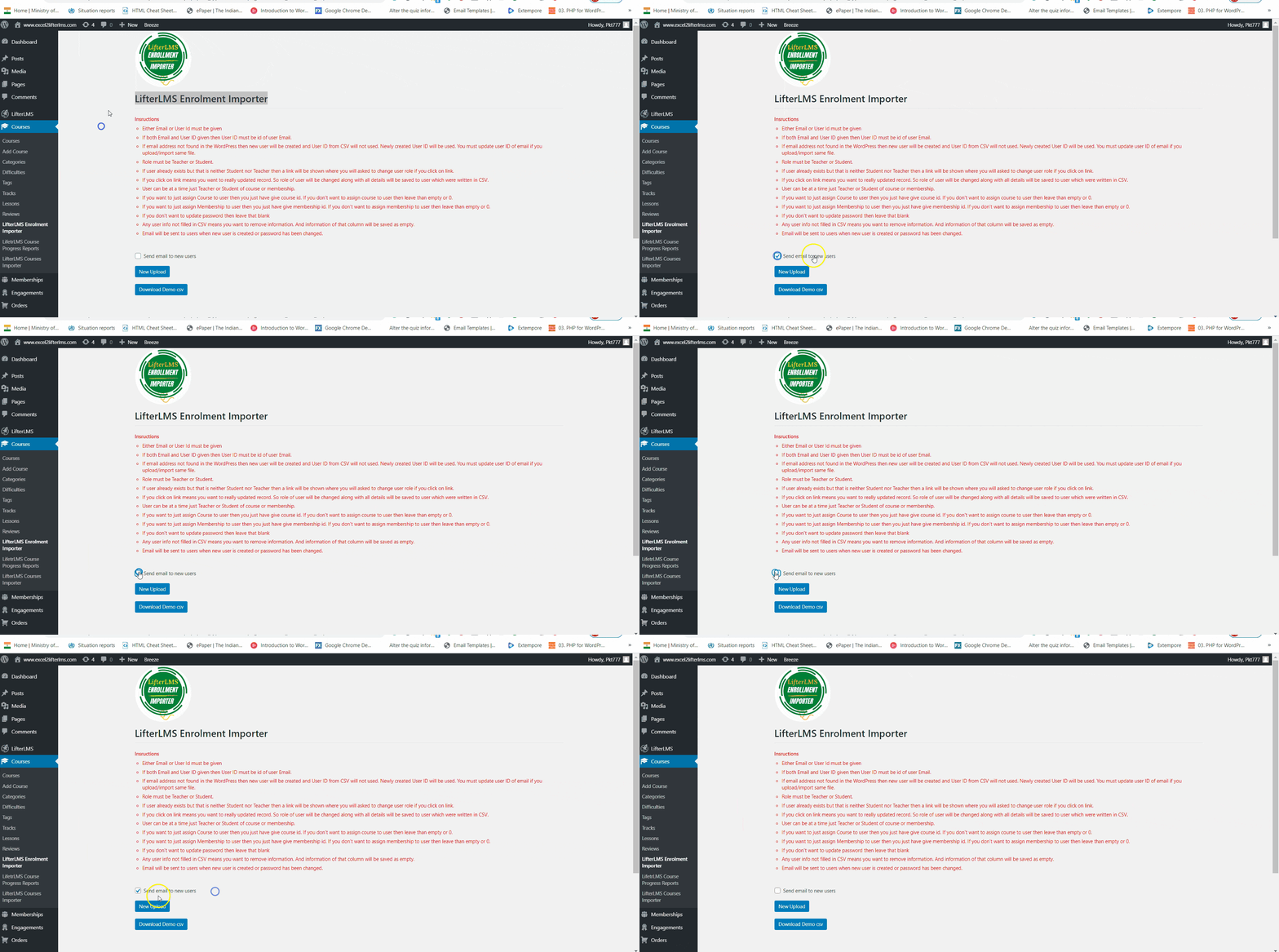
Step-by-step walkthrough of the CSV upload and enrollment workflow
How to assign more than one course to a student?
See every field, every option, and every enrolled student — all from one upload
Here's What We Hear Every Day:
Real frustrations from LifterLMS administrators just like you
"I spent three hours enrolling one corporate team. There has to be a better way."
😤 Manual enrollment is painfully slow. Enrolling students one by one wastes hours of admin time, especially with large groups or corporate clients.
"Why doesn't LifterLMS just let me upload a spreadsheet? Every other platform does this."
📋 No built-in bulk import tool. LifterLMS doesn't natively support CSV-based bulk enrollment, leaving admins without an efficient batch import solution.
"Each student needs four courses. I have 80 students. I can't keep doing this manually."
🔁 Multi-course assignment is tedious. When a student needs several courses, there's no simple way to handle it at scale — until now.
Here's What Changes Everything:
One dedicated CSV import tool built specifically for LifterLMS that lets you enroll any number of users into multiple courses and memberships simultaneously — from a single file upload.
Whether you're onboarding a corporate team, migrating platforms, or adding a new student cohort, this plugin turns a multi-hour task into a four-step process that takes minutes.
Your Journey Starts Here
Three steps. Minutes, not hours. Every student enrolled exactly where they need to be.
Install the Plugin & Download the CSV Template
Install LifterLMS Custom User Enrollment Import Plugin on your WordPress site running LifterLMS v4.4 or higher. Then download the included CSV template file — your perfectly structured starting point is already waiting for you.
Fill In Your CSV with User & Enrollment Data
Populate the CSV with your users' details — at minimum their Email or User ID. Add Course IDs, Membership IDs, and any of the 13 supported fields you have available. For multiple course assignments, simply repeat the user row with a different Course ID.
Upload the CSV & Enroll Instantly
Upload your completed CSV through the plugin interface. Toggle the Send Mail option if you want users notified, then submit. Every user is imported and enrolled in their respective courses and memberships immediately — your work here is done.
Built to Be Trusted
Every detail of this plugin — from its refund policy to its licensing model — is designed to give you complete confidence before and after purchase.
One Decision That Changes Everything
Stop spending hours on manual enrollment. One annual subscription gets every student where they need to be — automatically.
Annual Subscription · Single Domain
- You get bulk CSV user import into LifterLMS
- You get enrollment into multiple courses & membership plans
- You get all 13 importable data fields per user
- You get admin-controlled email notification toggle
- You get a ready-to-use downloadable CSV template
- You get a single-domain secure API license
- You get free updates & support while your subscription is active
- You get a 30-day full refund guarantee — zero risk
30-day full refund guarantee · Instant access after purchase
Your Questions, Honestly Answered
No marketing speak — just straight answers to what you're actually wondering.
Which version of LifterLMS do I need for this to work?
The plugin is compatible with LifterLMS version 4.4 and above. Please ensure your LifterLMS installation is updated to at least version 4.4 before installing this extension — that's all that's required on the LifterLMS side.
What's the bare minimum I need in my CSV to get people enrolled?
Just the user's Email address or their User ID — that's it. Everything else (Name, Role, Address, Contact Number, Password, Organization, and more) is optional but fully supported if you have it available.
Can one student be enrolled into several courses from a single CSV upload?
Absolutely. To assign multiple courses to a single student, add a separate row for each course using the same user data but a different Course ID in each row. All rows are processed together on upload, so it all happens in one go.
Will my students receive an email when they're enrolled?
That's entirely your call. Email notifications are optional and controlled by you as the admin. The Send Mail option is unselected by default — if you want users to receive an enrollment email, simply tick the checkbox before uploading. Your WordPress email configuration does need to be set up and working for this to send successfully.
I tested it on my staging site — can I move the license to my live site?
Yes, this is fully supported. If you activated the API on a staging site first and need to deploy on your live domain, simply send an email to the support team requesting a one-time complimentary API transfer. It's included at no extra charge.
What exactly do I get with the annual subscription, and what if I want a refund?
Your annual subscription includes a single-domain API license, free plugin updates, and free support from the development team for the full duration of your active subscription. If you're not satisfied with the plugin for any reason, a full refund is available within 30 days of purchase — no questions asked.
Start Enrolling Users in Bulk Today
Stop enrolling students one by one. Upload a CSV and get every user enrolled in the right courses and memberships in minutes — backed by a 30-day full refund guarantee.
Annual subscription · Instant access · 30-day money-back guarantee