Export LearnDash Quizzes to Excel Instantly — select any course, click one button, download clean XLSX data.
No manual data entry. No native LearnDash export. No corrupt downloads. Just one plugin that does the job in seconds.
Watch the Plugin in Action
Demo Video on Learndash Quiz Export
One-Click Export
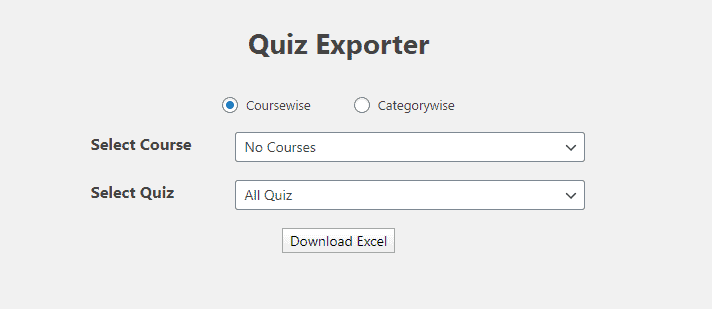
Trigger a full XLSX export of your LearnDash quiz data with a single button press — no coding needed.
Course or Category Scope
Export by specific course or filter by question category for granular, organised spreadsheet outputs.
ZIP-Compressed & Reliable
Every export is wrapped in a ZIP archive — no failed downloads, no corrupted files, even on shared hosting.
The problem nobody talks about
Running LearnDash without a proper quiz export tool costs you more than you think.
Copying LearnDash quiz questions, answers, and results into spreadsheets by hand is tedious, error-prone, and pulls you away from what matters.
LearnDash doesn't offer a built-in way to export quiz content to XLSX, leaving admins with no clean spreadsheet record of their course assessments.
Exporting big quiz datasets can overwhelm server memory and bandwidth — without ZIP compression, downloads fail or corrupt mid-transfer.
Every Feature You Need
Ten powerful capabilities — all included in one plugin at one price.
XLSX Export Format
Exports LearnDash quiz data directly into Microsoft Excel-compatible XLSX format, ready for reporting, auditing, or offline review. Works with Excel, Google Sheets, and more.
✓ Excel-ready outputCourse-Wise Export
Select a single course or all courses at once and export associated quizzes in one click.
Question Category-Wise Export
Filter and export quizzes by question category for granular, organised spreadsheet outputs.
Zipped Export Files
All exported files are packaged in ZIP format to reduce size and prevent download failures.
One-Click Download
A single button triggers the quiz export — no complex configuration or coding required.
LearnDash 3.1.3+ Compatibility
Fully compatible with LearnDash version 3.1.3 and above, including modern installations.
API Licence Activation
Single-domain API licence included. Enter your key on activation to unlock full functionality.
Staging Site API Request
Test on staging first — request a one-time additional API key via email within 10 days of purchase.
Free Updates for Subscription Duration
Receive all future plugin updates at no additional cost, keeping your tool current and compatible.
Free Support for Subscription Duration
Access dedicated plugin support throughout your subscription to resolve any questions quickly.
Up & Exporting in 3 Steps
Upload the downloaded ZIP file through your WordPress Admin dashboard, then activate the plugin using the API licence key provided after purchase.
Choose to export quizzes from a specific course or across all courses, and optionally filter by question category for a more targeted export.
Hit the export button and your quiz data is compiled into an XLSX file, compressed into a ZIP archive, and downloaded to your device instantly.
Trusted, Secure & Fully Supported
One Plugin. One Price. Complete Control.
Everything you need to export LearnDash quiz data — no hidden fees.
single domain licence
- XLSX quiz export for LearnDash
- Course-wise & question category-wise filtering
- ZIP-compressed export files
- Single domain API licence
- Staging site API key available on request
- Free updates for subscription duration
- Free support for subscription duration
- LearnDash 3.1.3+ compatible
Frequently Asked Questions
Which version of LearnDash is this plugin compatible with?
The plugin is fully compatible with LearnDash version 3.1.3 and above. It has been tested and updated to work with the latest LearnDash releases.
Can I use this plugin on more than one domain?
Each purchase includes a single-domain API licence for one live site. If you need to test on a staging site, you can email within 10 days of purchase to request a one-time additional API key for the staging environment at no extra charge.
What format are the exported quiz files in?
Quizzes are exported in XLSX format (Microsoft Excel), which is compatible with Excel, Google Sheets, and most other spreadsheet applications. The file is also wrapped in a ZIP archive for reliable downloading.
Can I export quizzes from all courses at once?
Yes. You can choose to export quizzes from a single specific course or from all courses simultaneously, giving you flexibility based on your reporting needs.
Why is the exported file in ZIP format?
ZIP compression is used to reduce file size and avoid server memory or bandwidth issues that can cause large exports to fail or corrupt during download, particularly on shared hosting environments.
Do I get updates and support after purchase?
Yes. Your purchase includes free plugin updates and free support for the duration of your subscription, ensuring the plugin stays compatible and you have help when you need it.
Start Exporting Your LearnDash Quizzes Today
One plugin, one click, clean Excel output. Get your API licence, install in minutes, and take full control of your quiz data.


Reviews
There are no reviews yet.