Create Fresh Quizzes From Existing Questions
LearnDash QuizMixer lets you remix questions from any of your existing published quizzes into a brand-new randomised assessment — in minutes, without any manual copy-pasting. Pick sources by quiz name or category, set a question count, and publish instantly.
Product Demo
Watch how QuizMixer makes building new quizzes effortless.
Video Demo of Quiz Mixer New Version
Deep-Dive Demo
A closer look at category-based mixing, question counts, and the Auto Start option.
Learndash Mixed Quiz Out Of Quiz Categories
The Old Way vs. The QuizMixer Way
😩 Without QuizMixer
- ✗Drowning in disconnected quiz banks — hundreds of questions across courses with no way to combine them into a single fresh assessment.
- ✗Rebuilding quizzes from scratch wastes hours — manually hunting for questions, copying content, and reformatting every single time.
- ✗No way to organise mixed quizzes by category — existing LearnDash tools don't let you pull questions by category and save the result cleanly.
✅ With QuizMixer
- ✓Pull questions from any quiz or entire category into one new assessment — no originals touched, no manual work.
- ✓Create a complete randomised quiz in under two minutes by selecting sources, setting a question count, and saving.
- ✓Assign the new mixed quiz to a fresh category and keep your entire course library tidy and easy to navigate.
Powerful Features, Zero Complexity
Mix Questions From Multiple Quizzes
Pull questions from any combination of your existing published LearnDash quizzes to form a completely new quiz without touching the originals.
Select Questions by Category
Choose a quiz category as the source and QuizMixer will draw questions from every quiz within that category automatically.
Select Questions by Individual Quiz Name
Prefer to hand-pick source quizzes? Select them by name and define exactly how many questions to pull from each.
Restrict Question Count
Set the exact number of questions you want in the new quiz. The plugin randomly selects that many questions from your chosen sources.
Randomised Question Selection
Questions are chosen at random from the source pool, ensuring every learner gets a varied and unpredictable assessment experience.
Randomised Question Order
Beyond random selection, question order within the mixed quiz can also be randomised for an added layer of test integrity.
Save Under a New Category
Assign the newly created mixed quiz to an entirely new category, keeping your course library organised and easy to navigate.
Auto Start Option (v1.6)
Version 1.6 introduced a new Auto Start option, allowing the mixed quiz to begin automatically without requiring an extra learner interaction.
Instructor-Level Access
Instructors can use the plugin with the same capabilities as an Admin, empowering course creators to manage quiz mixing independently.
Optional Quiz Description
Add a name and an optional description to every new mixed quiz so learners understand the scope and purpose of each assessment.
Quiz Listed on Quiz Listing Page
Once saved, the new mixed quiz appears automatically on the LearnDash quiz listing page, ready to be assigned to any course or lesson.
Broad WordPress & LearnDash Compatibility
Tested on WordPress 4.5 and above, and compatible with LearnDash 2.6 and all later versions, ensuring stable performance on modern installs.
Up and Running in Minutes
Install & Activate
Upload and activate LearnDash QuizMixer just like any standard WordPress plugin. No complex configuration needed.
Name Your Quiz & Choose Sources
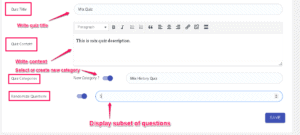
Give the quiz a name, then select source questions by individual quiz name or category and restrict the question count.
Save & Publish Instantly
Hit Save. The randomised quiz is created immediately and appears on your quiz listing page, ready to assign to any course.
Buy With Confidence
Every purchase is backed by solid guarantees so you can get started without hesitation.
One-Time Payment. Yours Forever.
- ✓Mix questions from any published LearnDash quizzes
- ✓Select sources by quiz name or category
- ✓Set exact question count with random selection
- ✓Randomised question order option
- ✓Auto Start option (v1.6)
- ✓Instructor-level plugin access
- ✓1-year email & forum support
- ✓One site licence (single domain)
No setup fees · Instant access · Originals never modified
Frequently Asked Questions
Does QuizMixer work with my current version of LearnDash?
Yes. The plugin is compatible with LearnDash 2.6 and all versions upward, as well as WordPress 4.5 and above, including the latest releases.
Can I pull questions from more than one quiz at a time?
Absolutely. You can select multiple individual quizzes by name or choose an entire quiz category as the source, and QuizMixer will draw questions from all of them.
How many sites can I use this licence on?
Your purchase includes a single-domain API licence. If you need to move from a staging site to a live site, simply email the support team for a one-time additional API key at no extra charge.
Will the questions in the original quizzes be affected?
No. QuizMixer creates an entirely new quiz by fetching questions from existing ones. The original quizzes and their questions remain completely unchanged.
What does the Auto Start option do?
Introduced in version 1.6, the Auto Start option allows the mixed quiz to begin automatically when a learner opens it, removing the need for an extra click to start the assessment.
What support is included with my purchase?
You receive one year of email and forum support from the development team, covering installation questions, compatibility issues, and general usage guidance.
Stop Rebuilding Quizzes From Scratch
For a one-time investment of $65, QuizMixer gives you a smarter, faster way to create randomised assessments from the quiz bank you've already built.
Instant download · 1-year support · Single site licence