For LearnDash Course Builders
If you've ever spent an entire afternoon entering quiz questions one… by… one — this is for you.
Stop manually adding quiz questions one by one. Upload thousands of questions from a spreadsheet and export quizzes across courses in just a few clicks. Two plugins. One price. Zero wasted afternoons.
See it in action
Watch the story unfold
Video on New Learndash Quiz Import Export Plugin
Watch how the LearnDash Quiz Import Export Plugin changes the way you build courses
Real frustrations we hear every day
Here's what we hear every day:
⏳
Manual quiz creation wastes hours
Adding quiz questions one by one inside LearnDash is painfully slow — especially when you have hundreds or thousands of questions to manage.
🌐
No easy way to scale multilingual quizzes
Building courses for global audiences means recreating quizzes in every language from scratch, with no efficient workflow in sight.
🔄
Moving quizzes between platforms is a nightmare
Exporting quiz content to another LMS or backing it up requires manual copy-paste work with no structured format to rely on.
Here's what changes everything
One Plugin That Handles Every Quiz Workflow
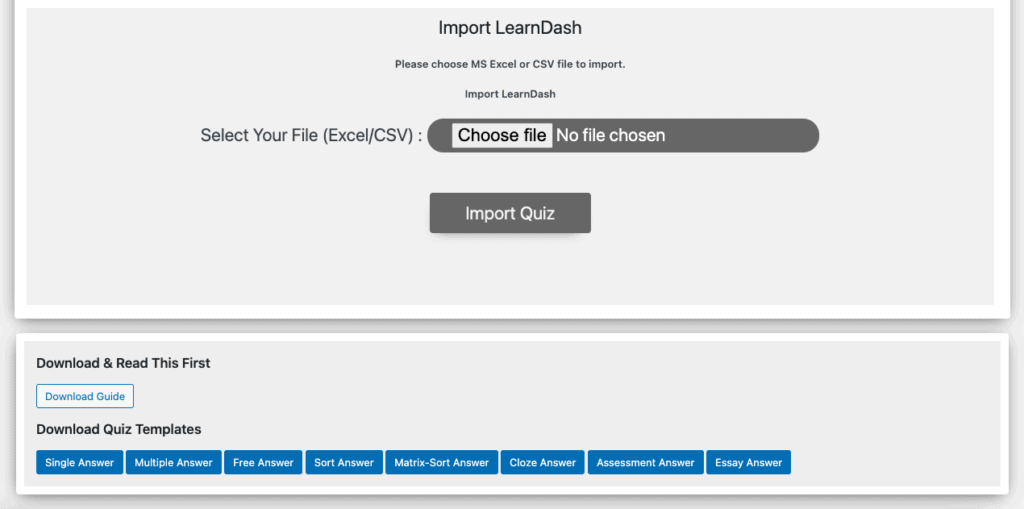
The LearnDash Quiz Import Export Plugin combines two powerful tools into a single solution. Import thousands of questions from a simple Excel or CSV template — including all eight LearnDash question types, image-based questions, math equations, and multilingual content.
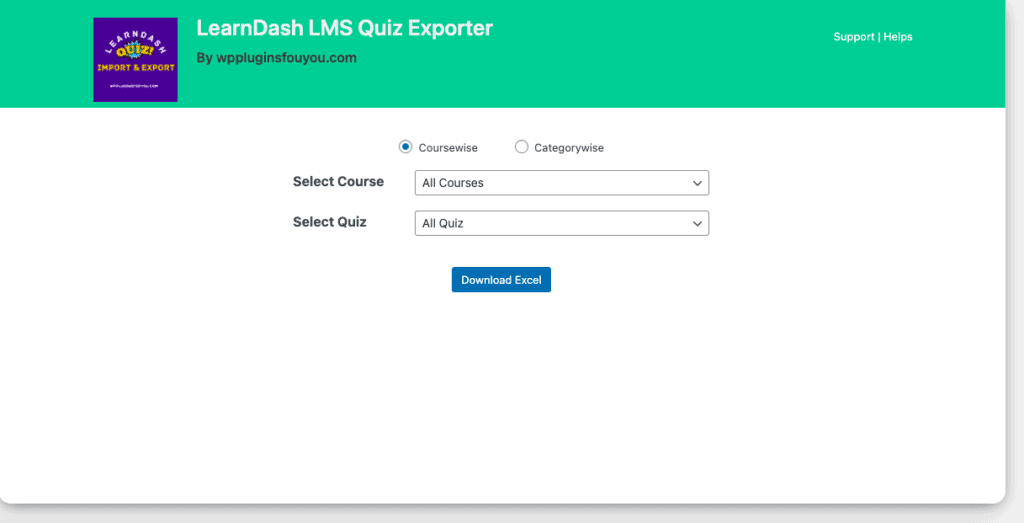
On the export side, choose to export quizzes by course, all courses at once, or by category. Everything you need to build, maintain, and migrate quiz content lives in one plugin.
Simple. Straightforward. Fast.
Your journey starts here
Download the Import Template
Get the pre-built Excel or CSV template and fill in your quiz questions, answer choices, question types, and course assignments directly in the spreadsheet. No special skills required — if you can use a spreadsheet, you're already set.
Upload and Import in Clicks
Navigate to the plugin's import panel inside your WordPress dashboard, upload your completed spreadsheet, and let the plugin create all quizzes and questions automatically. Your questions go from file to live course in minutes, not hours.
Export Anytime by Course or Category
Use the export tool to select one course, all courses, or filter by category. Download an optimized spreadsheet instantly for backup, editing, or use on another LMS platform. Your quiz data is always portable and under your control.
You're in good hands
Built to last, backed with care
Every purchase comes with everything you need to keep your quiz workflows running smoothly — today and well into the future.
Simple, honest pricing
One decision that changes everything
Everything included. No hidden fees. No per-site surprises. Just one plugin that saves you hours every week.
LearnDash Quiz Import Export Plugin
per year — Gold Membership included
- You get bulk import from Excel or CSV
- You get all 8 LearnDash question types supported
- You get image quiz import for richer assessments
- You get LaTeX & MathML math question support
- You get multilingual quiz import for global reach
- You get course assignment directly from your spreadsheet
- You get export by course or category on demand
- You get support & updates while your subscription is active
No jargon. Just honest answers.
Your questions, honestly answered
Does this plugin work with my version of WordPress and LearnDash?
The plugin requires WordPress 5.8 or higher and PHP 7.4 or later. It is built specifically for LearnDash and supports all eight of its native question types. If you're running a modern WordPress installation with LearnDash, you're good to go.
What file formats can I use to import quiz questions?
You can import quiz questions using either Excel (.xlsx) or CSV files. A pre-built template is provided so you know exactly how to structure your data before uploading — no guesswork required.
Can I import math questions without installing extra plugins?
Yes. The plugin supports both LaTeX and MathML formats natively, so you can import complex math equations without needing any additional third-party rendering plugins. It just works, right out of the box.
How do I assign quizzes to specific courses during import?
Course assignment is handled directly inside the import spreadsheet. Simply specify the course in the template before uploading and the plugin will assign each quiz automatically upon import — no manual linking needed afterwards.
What happens to my access if my subscription expires?
Support and updates are available as long as your subscription remains active. If your subscription lapses, the plugin will continue to function but you will no longer receive updates or support. Your quizzes and data remain intact.
Can I export quizzes and use them on a different LMS platform?
Yes. The export feature generates an optimized spreadsheet format designed for smooth transfers, making it suitable for importing into other LMS platforms beyond LearnDash. Your quiz content stays portable and fully yours.
Build Better Quizzes in a Fraction of the Time
Stop spending hours on manual quiz entry. Import thousands of questions, export entire course libraries, and manage your LearnDash quizzes at scale — all from a single plugin.
✓ Instant Access · ✓ Annual Updates · ✓ Gold Membership Included