If you've ever worried that someone out there is passing off a forged copy of your LearnDash certificate…
Verify Every LearnDash Certificate Instantly
Stop certificate fraud on your LearnDash site. Automatically generate a unique verification ID and QR code for every certificate issued — so employers, HR teams, and students can validate credentials in seconds.
See the story unfold
Watch how this plugin changes the way you issue and protect course credentials.
Watch the video on Learndash Certificate UCID Plugin
Watch how LearnDash Certificate Verification changes the way you work
A closer look at QR verification
Dive deeper into QR code generation and the student profile verification experience.
QR Code on User Profile Page
See every verification touchpoint in action
Here's what we hear every day:
Fake certificates are undetectable
Employees can forge or alter your LearnDash certificates and submit them to HR departments with no way to cross-check authenticity — damaging your brand and your clients' trust.
Manual verification wastes your time
Without an automated system, the only way to confirm a certificate is genuine is to contact you directly by email — an inefficient process that scales poorly as enrolments grow.
No unique proof tied to the learner
Every certificate looks identical except for names and grades, making it impossible to distinguish a legitimate credential from a copied or doctored one.
Here's what changes everything:
LearnDash Certificate Verification Unique ID Generator Plugin adds a tamper-proof verification layer to every certificate your site issues. The moment a user earns a certificate, the plugin generates a unique ID tied exclusively to that learner and course — creating an auditable record anyone can check without contacting you.
Version 3.8.1 goes further by generating a scannable QR code directly on the certificate and on the student's profile page, enabling instant, one-scan verification from any smartphone.
Unique Certificate ID Generation
Every certificate issued automatically receives a unique ID permanently associated with the user and course — no duplicates, no ambiguity.
Admin Certificate Dashboard
The site admin gets a full list of all certificates generated, showing the user name, course name, user details, and date of generation in one central view.
Mobile-Responsive Verification Page
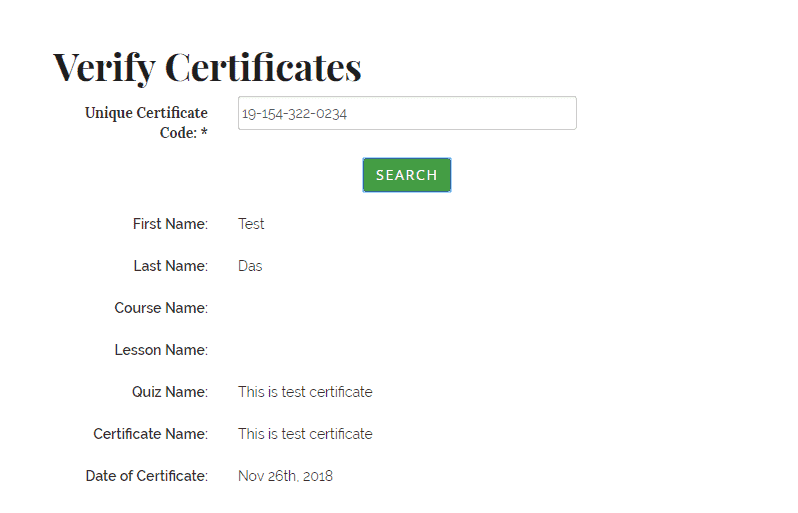
A simple shortcode lets you embed a fully mobile-responsive certificate verification page anywhere on your site so anyone can confirm authenticity on any device.
Three-Way Certificate Lookup
Certificates can be verified three ways — by Unique ID, by User ID, or by Email address — giving verifiers flexible options to confirm credentials.
Multi-Language Search Page
The certificate search and verification page supports every language that LearnDash supports, making it accessible for international course audiences.
Shareable Hyperlink for Certificate ID
A clickable hyperlink tied to the certificate's unique ID can be printed on the certificate, shared on a LinkedIn profile, or distributed by email.
User Profile Photo on Verification Page
The verification page displays the learner's profile photo pulled from Gravatar. If no Gravatar exists, a default photo set by the admin is shown instead.
Custom Fonts on Verification Page
Admins can customise the fonts displayed on the certificate verification page to align with their site's branding and style guidelines.
Print Certificate from Verification Page
Learners and verifiers can print the actual certificate directly from the verification page without needing to navigate back to the course area.
Admin Control Over Displayed Details
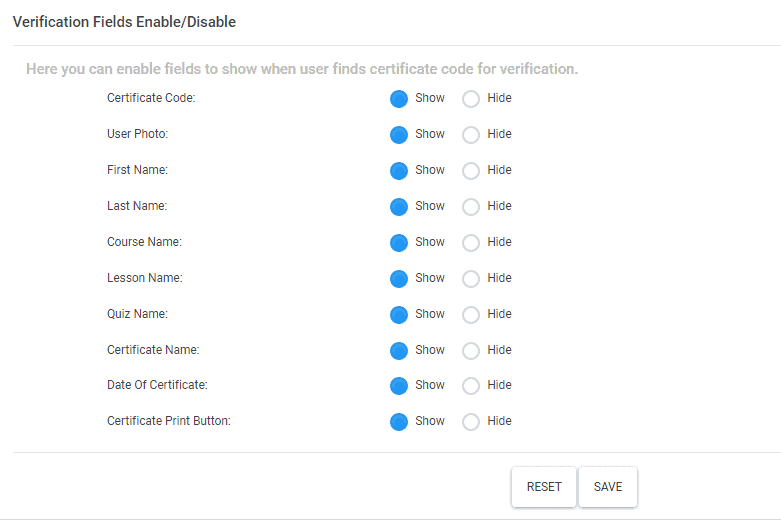
The admin can choose exactly which details are shown or hidden on the verification page, giving full control over the information presented to verifiers.
QR Code on Certificate
Version 3.8.1 adds an auto-generated QR code to the LearnDash certificate itself, allowing instant smartphone-based verification of authenticity.
QR Code on Student Profile Page
When a student completes a course, their profile page displays a QR code linked to their certificate verification — making it easy to share and prove credentials.
Your journey starts here
Install & Activate the Plugin
Purchase the plugin, receive your single-domain API licence key, and install it on your LearnDash site. Activate it and the plugin immediately begins generating unique IDs for every new certificate issued — zero configuration required to get started.
Add the Verification Shortcode to a Page
Paste the provided shortcode onto any page of your site to create a mobile-responsive certificate verification portal. Customise fonts, choose which details to display, and tailor the experience using the simple admin settings panel.
Learners Share, Employers Verify
Students receive certificates with a unique ID, a shareable hyperlink, and a QR code. Employers or HR teams visit your verification page or scan the QR code to instantly confirm the certificate is genuine — with no emails, no delays, no friction.
Built with confidence. Backed by support.
Everything you need to trust your purchase and get up and running without worry.
One decision that changes everything
A single annual licence. Zero compromise on your course credibility.
- You get a unique ID generated for every single certificate automatically
- You get QR codes on the certificate and on the student's profile page
- You get a mobile-responsive shortcode verification page for your site
- You get three-way lookup: by Unique ID, User ID, or Email
- You get a full admin dashboard with complete issuance records
- You get multi-language verification page support out of the box
- You get the ability to print certificates directly from the verification page
- You get 12 months of dedicated support and free plugin updates
Your questions, honestly answered
Does this work with my current version of LearnDash?
Yes. The plugin is built specifically as a LearnDash extension and is compatible with LearnDash's supported versions. Version 3.8.1 includes QR code generation and multi-language support aligned with LearnDash's language capabilities.
Does the plugin support Group Certificates?
No. The current version does not generate unique verification IDs for Group Certificates. It supports individually issued course certificates only.
Can I use the licence on more than one domain?
The purchase includes an API licence for one domain. If you first deploy on a staging site and then need to move to a live site, you can request a one-time additional API key by emailing the support team.
How does someone actually verify a certificate?
Anyone can visit the verification page on your site and look up a certificate three ways: by entering the Unique ID printed on the certificate, by the learner's User ID, or by the learner's email address. Alternatively, they can scan the QR code on the certificate with any smartphone camera.
What if a student has no Gravatar photo set up?
If the student has not set up a profile picture on Gravatar, the verification page will automatically display a default photo that the site admin has configured — so the page always looks professional and complete.
What support and updates come with my purchase?
Your purchase includes 12 months of customer support and access to all plugin upgrades released within those 12 months. The purchase is subject to the Buyer's Agreement outlined at the point of sale.
Protect Your Course Credentials Starting Today
Join course creators who've eliminated certificate fraud with automated unique ID and QR code verification — all for a single annual licence fee.